Deployment of a Scenario
A scenario deployment is the process of transferring a scenario from design to runtime status. This is achieved by uploading the scenario file (.psc) to the Orchestra runtime.
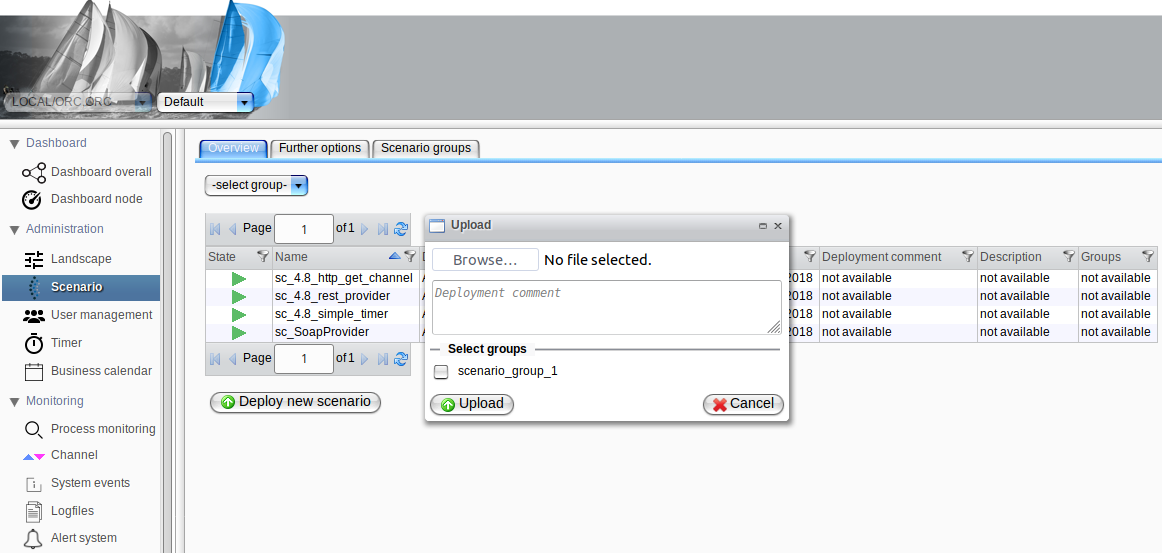
To deploy a new scenario, open the web interface and select the "Scenario" view from the "Administration" category on the left-hand navigation bar. Click the "Deploy new scenario" button. A dialog will be displayed, allowing you to open the file browser and select the scenario file (.psc) you wish to upload to the runtime.
Once you have selected a scenario file, you may enter a deployment comment if desired and add the scenario to an existing Scenario Group. Click the "Upload" button to initiate the upload of the scenario to the Orchestra runtime.
After successfully deploying your scenario, please take the following actions:
- Check your scenario landscape. Settings may differ across testing, design, and production environments.
- Activate the scenario, as the initial state after deployment is always
inactive.